
Discover how to plan, build, and optimise an infosite with effective keyword research, helpful content, technical SEO, user-focused design, and sustainable organic growth.
Introduction
An information website, commonly known as an infosite, is a digital platform designed to educate, inform, guide, and help people find reliable answers to their questions. Unlike a conventional business website that primarily promotes services or an e-commerce store that focuses on selling products, an infosite places valuable information at the centre of its purpose. It may publish educational articles, practical tutorials, industry guides, research-based explanations, frequently asked questions, comparison resources, and other content that addresses a clearly defined audience’s needs.
A well-planned infosite can become a valuable long-term digital asset. By publishing useful information, organising it into meaningful categories, and maintaining high editorial standards, website owners can build topical authority, attract relevant organic visitors, establish trust, and create opportunities for sustainable revenue. However, simply publishing a large number of articles is not enough. Successful information websites require strategic planning, careful keyword research, original insights, accessible design, sound technical foundations, and consistent performance evaluation.
At Monthly Website Design, the objective is to help businesses understand how effective website planning, user experience, and search engine optimisation can contribute to stronger digital performance. This guide explains the essential stages of developing an infosite, from choosing a niche and researching audience needs to creating high-quality content, improving technical performance, measuring results, and developing a sustainable growth strategy. Whether you are launching your first information website or improving an existing content platform, you will learn how to make practical decisions that support readers and long-term business objectives.
Understanding Infosites and Their Role in the Digital Landscape
An infosite is a website whose primary purpose is to provide useful, organised, and accessible information about a particular subject or group of related subjects. Examples include educational resource libraries, technology knowledge bases, home improvement guides, business information portals, personal finance education websites, travel planning resources, and specialist hobby publications. The defining characteristic is not the website’s size or appearance but the value it provides to its intended audience. A small website with twenty carefully researched articles can be more useful than a large publication containing hundreds of repetitive pages.
Information websites serve different purposes depending on their audience and business model. Some help beginners understand unfamiliar subjects, while others provide detailed technical instructions for experienced readers. A health education website may explain medical terminology using trustworthy references, whereas a software knowledge base might provide configuration instructions, troubleshooting procedures, and product documentation. The content format should reflect the questions readers need answered, the complexity of the topic, and the level of expertise expected from the audience.
The importance of infosites has increased as people use search engines to investigate products, learn new skills, compare solutions, and solve everyday problems. Google’s helpful, reliable, people-first content guidance emphasises content created primarily to benefit people rather than manipulate search rankings. This principle is especially important for information websites because their long-term value depends on usefulness, accuracy, clarity, and trustworthiness. Publishing material merely to target additional keywords may increase the number of pages without improving the experience.
A successful infosite therefore combines three essential elements: a clear informational purpose, a well-defined audience, and a dependable editorial process. Every significant page should have a reason to exist and should help readers accomplish something meaningful. Before publishing, ask whether the article answers a genuine question, whether its claims can be supported, and whether it offers sufficient detail for the intended reader. These checks establish a stronger foundation for sustainable organic visibility than simply chasing high-volume search terms.
Choosing the Right Infosite Niche and Defining Your Target Audience
Selecting a suitable niche is one of the most important decisions when building an information website. A niche determines the subjects you cover, the people you serve, the competitors you face, and the opportunities available for future expansion. Choosing a subject solely because it appears popular can lead to difficulties if you lack the knowledge, resources, or commitment required to publish useful material consistently. A more sustainable approach is to identify an area where audience demand, your capabilities, available evidence, and realistic business opportunities overlap.
Start by listing subjects you understand, have experience with, or can research responsibly. Then examine the problems people encounter within each subject. For example, a website focused on website management might help readers understand hosting, maintenance, performance optimisation, website security, and content management systems. Rather than attempting to cover every aspect of digital technology immediately, the publisher can begin with a clearly defined audience, such as small business owners who need practical guidance for managing their websites. This focus makes content planning and editorial decision-making easier.
Audience research should go beyond broad demographic assumptions. Consider the reader’s knowledge level, goals, constraints, common frustrations, preferred content formats, and reasons for searching. A beginner may need simple definitions, screenshots, and step-by-step instructions, while a professional may prefer detailed comparisons, technical explanations, and implementation considerations. Interviews, customer support questions, relevant online discussions, website analytics, and keyword research can reveal the language people actually use when describing their problems.
It is also important to evaluate the responsibility associated with your chosen niche. Topics involving health, financial decisions, legal matters, and personal safety may require stronger evidence, specialist review, and careful qualification of claims. Google discusses the importance of trust and the additional consideration that may be appropriate for content affecting people’s well-being in its Search Quality Rater Guidelines. These guidelines are useful for understanding quality expectations, although they are not a simple ranking formula. Choose a niche you can support with reliable information, appropriate expertise, and ongoing maintenance.
Finally, define a practical editorial boundary. Document the audience, core subject areas, excluded topics, preferred tone, and standard of evidence required for publication. A clear niche does not prevent future expansion; it helps you grow logically. Once the original audience is well served, related topics can be introduced where they genuinely support readers’ needs and fit the website’s overall purpose.
Conducting Keyword Research for an Information Website
Keyword research helps an infosite discover how people search for information, what questions they ask, and which topics deserve dedicated content. However, effective research is not simply a process of collecting phrases with high search volumes. It involves understanding the intent behind a search, identifying the information a reader expects, evaluating competing results, and deciding whether your website can provide a useful answer. A well-researched content plan prioritises relevance and value rather than treating every keyword as an independent publishing opportunity.
Begin with broad seed topics connected to your niche. If your website focuses on home energy efficiency, seed topics might include insulation, heating systems, energy bills, and draught prevention. Expand these subjects by examining specific questions, practical problems, comparisons, and related terminology. Keyword tools, search suggestions, customer enquiries, and specialist publications can help reveal opportunities. Google’s SEO Starter Guide provides a useful foundation for understanding how to make website content accessible and understandable to search engines.
Next, classify keywords according to search intent. Informational intent involves learning or finding an answer, such as understanding how insulation works. Comparative intent involves evaluating alternatives, such as comparing two heating technologies. Transactional intent suggests readiness to take an action, such as purchasing a product or booking a service. An infosite can address several intent types, but the content format must match the searcher’s objective. A basic explanatory guide should not be dominated by sales messages, while a comparison page should provide meaningful evaluation criteria rather than vague promotional claims.
Organise related keywords into topic clusters to prevent unnecessary duplication. For example, a central guide about website performance could link to supporting articles covering image optimisation, browser caching, hosting considerations, and Core Web Vitals. Each page should serve a distinct purpose while contributing to the broader subject. If several keywords express the same underlying need, one comprehensive page may serve them better than multiple thin articles. Review existing search results to understand the expected depth and format, but avoid copying competitors’ wording or simply reproducing their headings.
Prioritise opportunities by considering relevance, audience value, competition, available expertise, and the resources required to produce a high-quality page. Search volume is useful context, not a guarantee of traffic. Maintain a keyword map that records the target query, search intent, proposed URL, supporting topics, internal links, and content status. This creates a practical framework for planning, publishing, and reviewing content as audience needs and search behaviour evolve.
Developing a Strategic Content Plan and Editorial Calendar
A content strategy turns keyword research and audience insights into a structured publishing programme. Without a strategy, an infosite can become a collection of unrelated articles that compete for attention and fail to develop a coherent subject focus. A strong plan identifies the main problems the website will solve, the pages required to address them, the relationships between those pages, and the resources needed to keep the information accurate. It should also define what success means beyond simply increasing the number of published URLs.
Start by establishing a small set of core content pillars. These are broad subject areas that support the website’s purpose and audience. For a digital skills infosite, the pillars might include website management, search engine optimisation, content development, and digital analytics. Each pillar can contain supporting articles that answer narrower questions. This structure allows readers to move naturally from introductory information to detailed instructions, comparisons, and troubleshooting resources. It also helps editors identify missing topics and avoid producing repetitive material.
Build an editorial calendar around audience needs and available capacity. Each planned article should have a working title, intended reader, primary question, search intent, supporting evidence, content owner, proposed publication date, and review requirements. Include different content formats where appropriate, such as tutorials, glossaries, checklists, case studies, explainers, and comparison guides. Do not publish at an unsustainable pace simply to meet an arbitrary quota. A manageable schedule of well-researched articles is generally more valuable than a high-volume schedule that compromises editorial quality.
Before drafting, create a content brief that explains the page’s purpose, scope, important subtopics, evidence requirements, expected reader knowledge, and desired outcome. Identify the questions that must be answered and the misunderstandings that need clarification. Where practical, include examples drawn from real implementation experience, original observations, or transparent analysis. These details help distinguish a genuinely useful article from a generic summary of information already available elsewhere.
Finally, establish an editorial review cycle. New pages should be checked for factual accuracy, clarity, completeness, accessibility, and consistency with the site’s standards. Existing pages should be reviewed when important facts change, external resources become outdated, user feedback reveals gaps, or performance data suggests that the content no longer satisfies its intended purpose. An editorial calendar should therefore track both new publication and content maintenance. This approach makes an infosite a managed information resource rather than a static archive of old articles.
Creating High-Quality Content That Demonstrates E-E-A-T
High-quality content is the central asset of an infosite. Readers visit because they need an answer, explanation, or practical solution, so the content must fulfil that need accurately and efficiently. Strong articles demonstrate subject understanding, explain complex concepts in accessible language, distinguish established facts from uncertain claims, and help readers decide what to do next. Length alone does not make a page valuable; the appropriate level of detail depends on the subject, reader expectations, and complexity of the problem being addressed.
Google’s E-E-A-T framework refers to Experience, Expertise, Authoritativeness, and Trustworthiness. It is a useful way to evaluate content quality, but E-E-A-T is not a single score that website owners can directly optimise. Experience may be demonstrated through authentic examples of using a product or completing a process. Expertise is reflected in accurate explanations and appropriate subject knowledge. Authoritativeness can be supported by a consistent record of useful work and credible recognition. Trustworthiness depends on factors such as factual accuracy, transparent sourcing, clear ownership, appropriate disclosures, and responsible treatment of readers.
To apply these principles, develop an editorial standard that explains how information is researched, checked, written, and approved. Cite primary sources when making technical claims, especially when official documentation is available. Distinguish personal observations from verified facts, disclose relevant commercial relationships, and avoid presenting estimates as guaranteed outcomes. Author biographies can explain relevant qualifications or experience when those details are genuine and relevant. For subjects requiring specialist knowledge, seek appropriate expert review rather than implying credentials that the content team does not possess.
Original value is equally important. An article can add value through a carefully explained procedure, a practical example, an original comparison, a troubleshooting framework, or a synthesis that helps readers understand several related concepts. For instance, instead of merely listing website speed recommendations, a useful guide might explain how to identify a performance bottleneck, prioritise fixes, test changes, and recognise trade-offs. Such content helps readers apply the information rather than simply repeat it.
Use a clear structure with descriptive headings, meaningful examples, concise explanations, and useful links to supporting resources. Remove unsupported claims, redundant paragraphs, misleading promises, and unnecessary repetition. Google’s guidance on creating helpful content is a useful reference when evaluating whether an article provides genuine value. The ultimate objective is to create a resource readers can understand, trust, and use—not a page written solely to occupy a position in search results.
Designing an Effective Infosite Structure and Navigation System
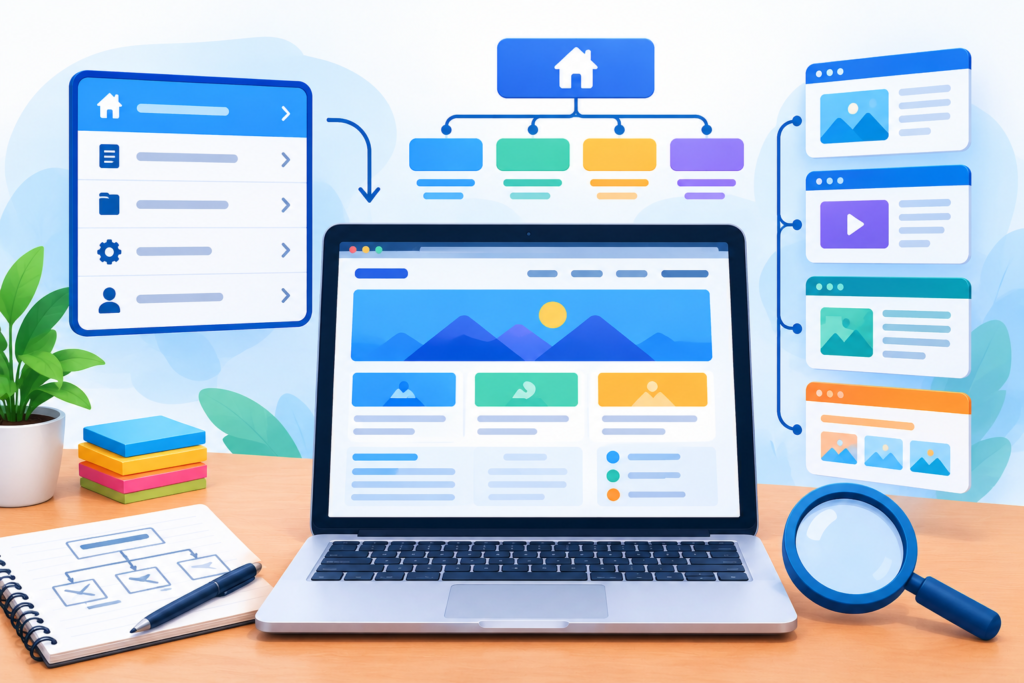
A well-organised website structure helps readers find relevant information without unnecessary effort. It also helps search engines discover pages and understand how different subjects relate to one another. For an infosite, the structure should reflect the way readers explore a topic, moving from broad explanations to more specific questions, practical instructions, and related resources. Poor organisation can make valuable content difficult to find, even when individual articles are accurate and comprehensive.
Begin with a logical hierarchy. The homepage should communicate the website’s purpose and direct visitors towards its main subject areas. Category pages should explain the topics they contain and provide useful access to relevant articles. Individual articles should focus on a clearly defined question or task. Where appropriate, a central resource page can introduce a broad subject and connect to detailed supporting guides. For example, a website about digital skills might organise its content into categories such as website fundamentals, content creation, online visibility, and analytics. Each category should have a meaningful purpose rather than existing simply to accommodate additional URLs.
Navigation labels should be descriptive, concise, and understandable without requiring specialist knowledge. Use menus, breadcrumbs, contextual links, and related-resource sections where they genuinely improve navigation. Avoid excessively deep structures that force visitors through several unnecessary clicks. On mobile devices, ensure menus are usable with touch controls and that important content is not hidden behind confusing interface elements. A search function may also help visitors locate information on a large infosite, especially when they know the terminology associated with their question.
Internal linking is particularly important because information websites often contain interconnected explanations. A page discussing technical SEO might link to a related guide about XML sitemaps, while an article about page speed could reference a detailed explanation of image optimisation. Links should appear naturally within relevant sentences, with anchor text that communicates the destination’s subject. Avoid repeating the same exact-match keyword unnaturally or linking to pages that provide little additional value.
Google’s guide to site structure offers useful guidance on making pages understandable and accessible. Review your navigation periodically using real user behaviour, website searches, and feedback. If readers frequently struggle to find an important resource, reconsider its placement, category, or internal links. The best structure is one that supports intuitive discovery, establishes clear topical relationships, and remains manageable as the website grows.
Implementing On-Page SEO for Infosite Content
On-page SEO involves improving individual pages so that their purpose and content are clear to readers and search engines. It includes descriptive titles, useful headings, relevant internal links, readable content, appropriate image descriptions, and accurate page metadata. These elements should work together to communicate what a page covers and help users determine whether it answers their question. Effective optimisation starts with the content itself; metadata cannot compensate for an article that is inaccurate, incomplete, or poorly matched to search intent.
Begin with a clear page title that describes the main subject and distinguishes the page from other resources on the website. Write a useful meta description that summarises the page’s value without making unsupported promises. Search engines may generate a different snippet depending on the query, so the description should be treated as a helpful summary rather than a guaranteed search-result display. Use a clear main heading and organise the body with descriptive subheadings that reflect the natural progression of the explanation. Headings should help readers navigate the material rather than serve as containers for repeated keyword variations.
Place important terminology where it naturally belongs, including the title, introduction, relevant headings, and explanatory paragraphs. There is no need to force a primary keyword into every section. Include related concepts when they genuinely help explain the subject, and use examples to clarify unfamiliar terminology. Write URLs that are understandable and reasonably concise, and avoid creating multiple near-identical pages simply to target minor keyword variations. If similar pages already exist, assess whether they serve different needs or whether consolidating them would provide a clearer and more comprehensive resource.
Images, diagrams, screenshots, and other media can make complex information easier to understand. Give informative images descriptive alternative text, while decorative images should not introduce irrelevant wording. Compress image files appropriately, choose suitable formats, and make sure media does not interfere with reading or mobile usability. Add structured data only when the page meets the requirements for the relevant schema type. Google’s structured data guidelines explain the importance of accurate markup that represents visible page content. Structured data does not guarantee a rich result or improved ranking.
Finally, review each page from the reader’s perspective. Check whether the title accurately reflects the content, the opening quickly establishes relevance, and the article answers its main question without unnecessary detours. Test links, check for broken formatting, and confirm that important content is accessible. Google’s SEO Starter Guide can support this process. A consistent on-page SEO checklist makes quality easier to maintain across an expanding infosite without turning writing into a mechanical keyword-placement exercise.
Technical SEO: Building a Search-Friendly Infosite
Technical SEO helps search engines discover, crawl, understand, and potentially index the pages of an information website. Even excellent content can struggle to attract organic visitors if important pages cannot be accessed properly, internal links are broken, or technical configuration creates unnecessary obstacles. Technical SEO should therefore be treated as an ongoing maintenance discipline rather than a one-time task completed when the website launches.
Start by reviewing the website’s crawlability and indexability. Important pages should be accessible through normal navigation and internal links, and they should return appropriate HTTP status codes. An XML sitemap can help search engines discover the URLs you consider important, although inclusion in a sitemap does not guarantee indexing. A robots.txt file can manage crawler access, but it should not be confused with a reliable method for removing a URL from search results. Page-level indexing directives, canonical tags, redirects, and status codes must be configured according to their intended purposes. Google’s crawling and indexing documentation explains these processes in greater detail.
Canonicalisation deserves particular attention on large infosites. Tracking parameters, sorting options, duplicate article versions, and inconsistent URL formats can create multiple addresses for substantially similar content. Establish a consistent preferred URL for each page and use internal links that point to the intended version. Redirect permanently moved pages when appropriate, and avoid chains or loops that create unnecessary navigation between URLs. Do not apply canonical tags indiscriminately to unrelated pages, because each directive should reflect a genuine content relationship.
Structured data can also help search engines interpret eligible content types when implemented accurately. Depending on the website, relevant markup might describe articles, breadcrumbs, or other supported entities. However, structured data is not a substitute for visible, useful content, and valid markup does not guarantee enhanced search-result presentation. Follow the official structured data policies and test implementations before deployment.
Use Google Search Console to inspect indexing reports, sitemap processing, selected canonical URLs, and relevant technical issues. Review important pages individually when a problem is suspected instead of assuming that every URL behaves identically. Establish a regular technical audit schedule and prioritise issues by their impact on important content. A sound technical foundation makes it easier for readers to access information and for search engines to process the website’s intended structure.
Improving User Experience, Mobile Usability, and Accessibility
User experience determines how easily visitors can find, understand, and use information. An infosite may attract a reader through search, but a confusing layout, intrusive advertising, difficult navigation, or unreadable text can prevent that reader from receiving the intended benefit. Effective design reduces friction and makes the content’s purpose clear from the first screen to the final section.
Begin with a readable visual hierarchy. Use clear headings, comfortable line spacing, sufficient contrast, and paragraphs that are manageable on different screen sizes. Important instructions should be easy to locate, while supporting information can appear in logically organised sections. Avoid excessive pop-ups, autoplaying media, unnecessary animations, and advertising placements that interrupt reading. If a page contains a lengthy tutorial, a table of contents can help visitors navigate directly to the section they need. Interface decisions should support the informational task rather than compete with it.
Mobile usability is particularly important because visitors may read articles while travelling, researching products, or following instructions on a small screen. Use responsive layouts that adapt to available space, ensure text remains readable without horizontal scrolling, and provide adequate spacing around interactive controls. Tables, images, embedded resources, and code examples should also adapt to mobile screens. Test pages on different devices and browsers, paying attention to navigation, form interactions, media loading, and content that might be obscured by fixed interface elements.
Accessibility should be part of the design process from the beginning. Use semantic HTML, meaningful heading order, descriptive link text, and alternative text for informative images. Ensure interactive elements can be operated using a keyboard and that visible focus indicators are available. Colour should not be the only method of communicating important information, and videos containing meaningful spoken information should have appropriate captions. These practices help people with different abilities access the same resources.
The Web Content Accessibility Guidelines provide an established framework for improving digital accessibility. Although meeting a particular checklist does not automatically guarantee a perfect user experience, accessibility testing can reveal practical barriers that might otherwise be overlooked. Gather feedback from actual users where possible, and review analytics alongside qualitative observations. The objective is not merely to create a visually attractive website; it is to ensure that readers can reach the information, understand it, and complete their intended tasks with minimal difficulty.
Optimising Website Performance, Security, and Reliability
Website performance affects how quickly visitors can begin interacting with an infosite and how comfortable the reading experience feels. Slow-loading pages can frustrate users, particularly when they rely on mobile connections or are trying to follow time-sensitive instructions. Performance improvements should focus on measurable problems rather than adding optimisation tools without understanding their effects.
Start with the main causes of unnecessary loading time. Large images, excessive JavaScript, render-blocking resources, inefficient server responses, and poorly configured third-party scripts can all affect performance. Resize images to suitable dimensions, compress them without unacceptable quality loss, and use modern image formats where appropriate. Load below-the-fold images lazily when suitable, while ensuring important above-the-fold content is not unnecessarily delayed. Reduce unused scripts and styles, review plugins, and avoid loading tracking tools that provide little practical value.
Use Google’s Core Web Vitals to understand important aspects of real-world user experience. These metrics cover loading performance, responsiveness, and visual stability. The commonly used measures are Largest Contentful Paint (LCP), Interaction to Next Paint (INP), and Cumulative Layout Shift (CLS). Their recommended thresholds can change, so consult the current official documentation when evaluating results. Laboratory tests are useful for diagnosing problems, while field data helps reveal the experiences of actual visitors. Neither should be interpreted without considering the page type, traffic patterns, and testing conditions.
Security is equally important because an information website may collect contact details, operate user accounts, publish comments, or integrate third-party services. Use HTTPS, maintain supported software versions, remove unnecessary extensions, restrict administrative access, and enable multifactor authentication where available. Establish reliable backups and test restoration procedures instead of assuming that a backup will always work. Apply updates through a controlled process, especially when plugins or themes could affect essential website functionality.
Follow established web security guidance and the relevant documentation for your hosting platform and content management system. Monitor uptime, review error logs when available, and investigate unexpected changes in page behaviour. For websites handling personal information, also consider appropriate data protection obligations and responsible retention practices.
Performance and security should be reviewed continuously. Establish a baseline, implement one meaningful change at a time where practical, and measure the result. This makes it easier to identify effective improvements, detect regressions, and maintain a reliable experience as the website grows.
Building Sustainable Monetisation Opportunities for an Infosite
An infosite can support several business models, but monetisation should complement the reader’s needs rather than undermine the website’s informational purpose. A revenue model that creates intrusive experiences or encourages biased recommendations may damage trust over time. The most appropriate approach depends on the niche, audience size, purchasing behaviour, editorial independence, and resources available to maintain the content.
Advertising is one possible revenue stream. Display advertising can generate income when a website attracts suitable traffic and meets the requirements of its advertising partners. However, revenue depends on factors such as visitor geography, subject matter, advertiser demand, viewability, and the number of monetised impressions. Excessive advertising can reduce readability and interfere with page performance. Place advertisements carefully, distinguish them from editorial content, and monitor whether their presence affects user engagement.
Affiliate marketing is another option for websites that evaluate products, tools, software, or services. An affiliate link may generate a commission when a reader completes a qualifying action. To make this model useful, recommendations should be based on genuine evaluation criteria and relevant evidence. Explain meaningful differences between options, identify limitations, and avoid claiming personal testing when no such testing occurred. Clearly disclose material relationships and ensure that commercial incentives do not determine editorial conclusions. The US Federal Trade Commission’s endorsement guidance provides information about disclosures and endorsements in the United States; publishers must also consider applicable rules in their own jurisdictions.
Other options include paid educational resources, downloadable templates, specialist reports, premium memberships, online courses, and relevant consulting services. For example, a website that publishes detailed business tutorials might offer a practical implementation workbook. The free content should remain genuinely useful, while paid resources provide additional depth, convenience, or specialised assistance. A service-oriented infosite might generate qualified enquiries by helping readers understand a problem before presenting an appropriate professional service.
Choose monetisation methods according to the audience’s needs and your ability to deliver ongoing value. Test new offerings gradually and monitor both revenue and reader satisfaction. Relevant measurements may include conversion rate, earnings per visitor, refund rate, repeat purchases, and the quality of enquiries. Avoid relying on a single revenue source if the business model can reasonably support diversification.
Above all, preserve editorial credibility. Readers should be able to understand why a recommendation appears, whether a commercial relationship exists, and what limitations apply. Sustainable monetisation comes from creating an information resource people trust and from offering relevant products or services without compromising that trust.
Promoting an Infosite and Earning Relevant Authority
Publishing a useful article is only one part of developing a successful infosite. Readers must also be able to discover the resource through relevant channels. A promotion strategy helps the website reach people who can benefit from its information while creating opportunities for meaningful engagement, references, and repeat visits.
Start by identifying where your audience already seeks information. Depending on the niche, useful channels may include professional communities, industry newsletters, relevant social platforms, discussion forums, email subscriptions, and partnerships with organisations serving similar audiences. Share content in ways that suit each channel rather than distributing identical promotional messages everywhere. A detailed tutorial may work well in a professional newsletter, while a concise checklist or explanatory graphic might be more suitable for a social post. Always follow community rules and avoid unsolicited bulk promotion.
Email can help an infosite maintain a relationship with readers who choose to subscribe. Offer a clear reason to join, such as a practical resource, a useful newsletter, or occasional updates on a specialised subject. Obtain appropriate consent, explain what subscribers can expect, and provide a straightforward way to unsubscribe. Email performance should be assessed in terms of relevance and engagement, not merely the size of the mailing list.
Another valuable objective is earning references from other relevant websites. Original research, genuinely useful tools, comprehensive explanations, and well-documented examples can provide reasons for other publishers to cite your resources. For example, a website might publish an original analysis of common website performance problems or a carefully sourced guide that helps professionals understand a complex process. Such resources can attract attention because they provide something useful to the wider community.
Do not confuse authority building with buying links or arranging manipulative link exchanges. Google’s spam policies for Google web search describe practices that may violate search guidelines, including link schemes designed to manipulate rankings. Focus on earning relevant editorial references through quality and genuine relationships rather than pursuing arbitrary backlink targets.
Partnerships with subject specialists can also improve the reach and usefulness of an infosite. Interviews, expert contributions, collaborative resources, and original surveys may introduce the website to new audiences when they offer real value. Ensure that contributions are authentic, permissions are obtained where necessary, and factual claims are properly checked.
Finally, assess promotion by its outcomes. Referral visits, engaged readers, newsletter subscriptions, qualified enquiries, and meaningful citations can all provide useful evidence. Not every promotional activity will generate immediate results, so prioritise the channels that reach the right audience and support the website’s long-term objectives.
Measuring Performance, Maintaining Content, and Scaling Growth

An infosite needs a measurement framework to determine whether its content is helping readers and supporting its objectives. Without reliable measurements, publishers may continue investing in pages that do not address audience needs while overlooking resources that deserve improvement. Analytics should inform decisions, not replace editorial judgement or encourage unnecessary changes to every page.
Begin by defining the outcomes that matter. Search visibility, organic clicks, engaged sessions, newsletter registrations, resource downloads, and qualified enquiries may all be relevant, depending on the website’s purpose. Use Google Search Console to review search queries, impressions, clicks, click-through rates, and average positions. These figures can help identify pages with growing visibility, relevant queries that deserve attention, and potential content gaps. However, average position and click-through rate must be interpreted in context because results vary by query, device, location, and search presentation.
Google Analytics can provide additional insight into visitor behaviour and important events. Configure tracking in accordance with applicable consent and privacy requirements, and avoid collecting information that is unnecessary or inappropriate. Google’s official Google Analytics documentation explains how to configure and interpret the platform’s reporting features. Choose a small set of meaningful key performance indicators instead of creating reports filled with numbers that do not influence decisions.
Content maintenance is another essential part of growth. Information about software, regulations, product features, industry practices, and technical standards can become outdated. Establish review priorities based on the potential consequences of inaccurate information, the frequency of change, and the importance of the page. Update claims that are no longer correct, replace broken references, clarify confusing instructions, and remove obsolete recommendations. If a page no longer serves a useful purpose, consider whether it should be improved, consolidated, redirected, or removed.
Scaling should follow evidence of demand and the team’s ability to maintain quality. Identify successful topic clusters, study unanswered reader questions, and expand into related areas where the website can provide genuine value. Document repeatable processes for research, writing, review, publishing, and quality assurance. Automation can assist with administrative tasks, but factual verification and editorial accountability must remain clear.
Review performance at regular intervals and record the reasoning behind significant changes. Compare appropriate time periods, account for seasonal patterns, and avoid attributing every traffic fluctuation to a single update. The aim is continuous improvement: understand what readers need, publish useful resources, measure their performance, correct weaknesses, and invest in opportunities supported by evidence.
Common Infosite Mistakes and Best Practices Summary
Common mistakes to avoid
One frequent mistake is publishing large volumes of content without a clear purpose. Rewriting information that already appears across many websites, adding little original insight, or creating multiple pages that answer essentially the same question can weaken the overall content offering. The solution is to prioritise genuine audience needs, define the purpose of every page, and consolidate overlapping material when doing so creates a more useful resource.
Another mistake is treating keywords as a writing formula. Repeating a phrase unnaturally, creating awkward headings, or forcing related terms into every paragraph can make an article difficult to read. Keyword research should inform topic selection and terminology, but the content must remain natural and comprehensive. Likewise, choosing subjects solely because they have high estimated search volume may attract the wrong audience or lead to unrealistic competition.
Neglecting technical maintenance can also limit results. Broken internal links, incorrect canonical tags, inaccessible content, slow pages, outdated software, and ineffective backup procedures can create unnecessary problems. These issues should be addressed through routine checks and prioritised according to their impact. Avoid installing multiple plugins or scripts that perform overlapping tasks without a clear reason.
Some publishers also monetise too aggressively, placing advertisements or promotional messages ahead of the information visitors came to find. Others publish unsupported claims, conceal commercial relationships, or imply experience and qualifications they do not possess. These practices can undermine credibility. Clear disclosures, accurate references, transparent authorship, and responsible recommendations help protect reader trust.
Finally, avoid judging success exclusively by traffic or rankings. A page may attract many visits without satisfying the reader’s needs, while a specialised resource with fewer visits may provide considerable value. Evaluate the website according to its purpose, audience, content quality, and meaningful outcomes.
Best practices summary
Use the following checklist as a practical framework for developing and maintaining an infosite.
- Define a clear niche and understand the audience’s actual information needs.
- Conduct keyword research and match each page to a distinct search intent.
- Organise content into logical categories and useful topic clusters.
- Publish accurate, original, well-structured, people-first content.
- Demonstrate relevant experience and expertise without exaggerating credentials.
- Link to reliable primary sources and maintain meaningful contextual internal links.
- Use descriptive page titles, readable headings, appropriate metadata, and relevant alternative text.
- Monitor crawling, indexing, canonicalisation, redirects, and broken links.
- Test mobile usability, accessibility, loading performance, and visual stability.
- Protect the website through updates, access controls, HTTPS, and tested backups.
- Monetise responsibly and disclose relevant commercial relationships.
- Promote resources through relevant channels and earn genuine editorial references.
- Track meaningful performance indicators using suitable analytics tools.
- Review outdated information and improve existing content when necessary.
- Scale publishing only when research, expertise, and editorial capacity support it.
These practices work best as a connected system. Content quality, site structure, technical reliability, promotion, and measurement reinforce one another. A weakness in one area can reduce the value of work completed elsewhere, so review the website holistically rather than treating SEO as a collection of isolated tasks.
Frequently Asked Questions
What is an infosite, and how does it differ from a regular website?
An infosite is primarily designed to provide information, education, explanations, or practical guidance on a defined subject. A regular website can serve many purposes, including selling products, promoting services, hosting applications, or presenting an organisation’s details. An infosite may still generate revenue, but its main content is intended to answer questions and help readers understand or complete tasks. Examples include educational portals, technical knowledge bases, specialist publications, and practical tutorial websites.
How much does it cost to build an infosite?
The cost depends on the scope, design requirements, technology, content volume, and maintenance needs. A small website built with an established content management system may require a relatively modest initial investment, while a large information portal with custom functionality, original research, expert review, and extensive content can cost considerably more. Ongoing expenses may include hosting, domain registration, development, content production, accessibility testing, security, and software updates. Prepare a budget that distinguishes initial setup from recurring operational costs, and prioritise the features necessary to serve the intended audience.
How long does it take for an infosite to gain organic traffic?
There is no universal timeline. Results depend on the website’s existing history, competition, content quality, technical accessibility, niche, and the relevance of its resources to searchers. New websites generally need time to publish useful content, earn recognition, and establish a record of performance. Some pages may attract impressions or clicks relatively early, while competitive topics can take substantially longer. Track progress through Search Console and other suitable analytics, and use the findings to improve content rather than relying on a guaranteed ranking deadline.
How many articles should an infosite publish each month?
The ideal publishing frequency depends on editorial resources and the complexity of the subject. A specialist website may benefit from publishing a few thoroughly researched articles each month, while a larger publication with a capable editorial team may support a more frequent schedule. There is no universal article quota that guarantees rankings. Prioritise audience relevance, factual accuracy, original value, and sustainable maintenance. A consistent schedule is useful, but publishing fewer stronger resources is preferable to filling the website with repetitive or low-value pages.
Can an infosite make money without selling its own products?
Yes. Potential revenue sources include display advertising, affiliate marketing, sponsorships, paid memberships, educational resources, digital downloads, and qualified service enquiries. The suitability of each model depends on the audience and subject matter. Advertising requires suitable traffic and programme eligibility, while affiliate income depends on relevant recommendations and qualifying actions. Paid resources need to offer clear additional value. A sustainable model should preserve editorial independence, disclose commercial relationships, and avoid making the reading experience unnecessarily intrusive.
Is keyword research still important for an infosite?
Keyword research remains useful because it helps publishers understand search language, audience questions, and the subjects people are trying to investigate. However, keywords should guide research and content planning rather than dictate every sentence. Effective research considers intent, context, competition, related questions, and the website’s ability to provide a trustworthy answer. A strong article may naturally address several closely related queries without requiring a separate page for each variation. The goal is to satisfy the reader’s need, not to repeat a phrase a predetermined number of times.
Should an infosite use AI to create content?
AI tools can assist with brainstorming, outlining, summarising source material, checking consistency, and identifying questions that an article should address. Their output still requires appropriate human oversight, factual verification, and editorial responsibility. Automatically generated content can contain inaccuracies, unsupported statements, and repetitive explanations. Publishing large quantities of pages primarily to manipulate search rankings may violate Google’s spam policies, regardless of how those pages were produced. Use AI where it improves the workflow, and ensure the finished material provides genuine value, follows appropriate sourcing standards, and reflects accountable editorial decisions.
How can an infosite build trust and demonstrate E-E-A-T?
Trust is supported by accurate information, transparent authorship, appropriate sourcing, clear disclosures, and reliable website operation. Demonstrate relevant experience through genuine examples and practical explanations. Ensure that contributors have appropriate knowledge for the subjects they cover, and seek specialist review where the consequences of inaccurate information are significant. Correct mistakes promptly and maintain important pages as information changes. E-E-A-T should be treated as a quality framework rather than a score or a guarantee of search rankings.
How often should an infosite’s content be updated?
The appropriate review frequency depends on the topic. Fast-changing technical documentation, software instructions, legal information, and other time-sensitive material may need frequent checks. Foundational explanations may remain accurate for much longer. Establish a review schedule based on risk, the rate of change, reader importance, and evidence of outdated information. Update pages when changes improve their accuracy or usefulness, rather than changing publication dates without meaningful revisions. Keep a record of significant corrections and verify external references periodically.
What is the most important factor in long-term infosite growth?
Long-term growth depends on consistently serving a clearly defined audience with reliable, useful information. This requires a combination of sound topic selection, strong editorial standards, accessible design, technical reliability, meaningful promotion, and ongoing measurement. No individual SEO technique can guarantee success. Focus on solving genuine problems, maintaining reader trust, and improving the website in response to evidence. These principles provide a more durable foundation than shortcuts designed to produce temporary ranking gains.
Conclusion
Building a successful infosite requires much more than choosing a domain name and publishing articles. It involves understanding an audience, selecting a suitable niche, researching search intent, developing a coherent content strategy, and creating resources that genuinely help readers. A reliable technical foundation, accessible design, effective internal linking, and responsible monetisation support the value of that content and make the website easier to maintain as it grows.
The strongest information websites treat quality as an ongoing responsibility. They verify important claims, explain limitations, correct outdated material, and measure performance to understand where improvements are needed. They also avoid shortcuts such as keyword stuffing, manipulative link schemes, and mass publication of low-value pages. Instead, they invest in useful resources, transparent editorial practices, and a consistent experience for their audience.
For businesses and publishers developing an infosite, Monthly Website Design can be a starting point for exploring website planning, design, and optimisation support. Begin with a clear objective, establish a realistic publishing process, and improve the website through measured, practical steps. Over time, a well-maintained infosite can become a trusted resource that supports organic discovery, reader engagement, brand credibility, and sustainable business opportunities.
Want to Implement This Easily?
Prompt Text:
You are an expert consultant. Based on the blog post titled “(Infosites)”, provide a step-by-step, practical implementation guide. Include tools, best practices, common mistakes to avoid, and advanced tips. Assume the reader wants to implement everything discussed in this article effectively.
Call to Action:
Want our help implementing this? Just reach out to us via our website contact form: Contact Us